-2.png?width=200&height=100&name=goEBT%20Transparent%20Background%20(800x400%20png)-2.png)
 |
Insert SP30 connector into the PIN Pad peripheral port on the bottom of the device. The SP30 automatically powers on upon successful connection if the device is powered on. Customers using the goEBT app may continue to the next step to enable the PIN Pad to work with the app. |
For new customers the SP30 PIN Pad should be pre-connected to the PAX A80 device and the below steps may be skipped.
|
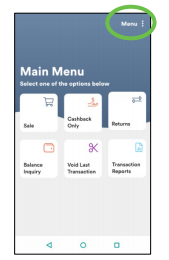
Launch the goEBT application and navigate to Menu > Terminal Settings. |

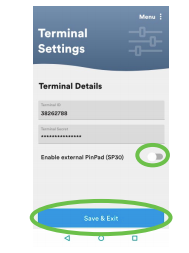 |
Toggle the SP30 button to the right to enable. Select Save & Exit. |
The SP30 PIN Pad is ready to use.
Customers using the goEBT+ app may contact technical support at 877-418-7957 regarding any issues using the PIN Pad.