-2.png?width=200&height=100&name=goEBT%20Transparent%20Background%20(800x400%20png)-2.png)
 |
A cardholder may decide to return or request refund an item bought with a Supplemental Nutrition Assistance Program (SNAP) Electronic Benefit Transfer (EBT) card, so long as store policy allows it. All refunds for food items purchased with SNAP benefits go directly back to the cardholder's EBT card. To initiate a Refund or Return Transaction, start from the Main Menu and select Returns. |
Per EBT and SNAP guidelines, a cash refund may not be given for EBT purchases.
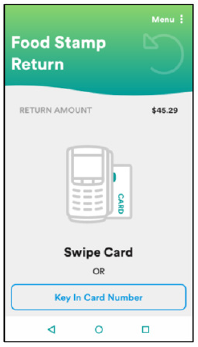 |
Enter the amount of the refund, then then select the Payment Method: Food Stamp, Cash Benefit, or Voucher Payment. Next, choose an entry method for the card details:
|
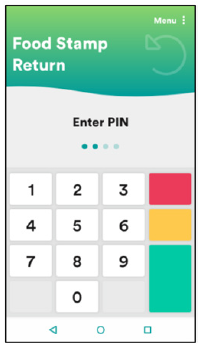 |
Allow the Cardholder to enter their PIN and select ENTER. |
Retailers may not enter a customer’s PIN for them. Customers must enter their own PIN.
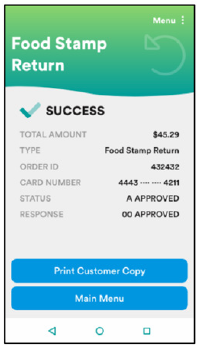 |
Select Print Customer Copy to print the receipt for the Cardholder. |
A copy of the merchant receipt will always print.
The Cardholder balance will be available only on the Cardholder's receipt. (This is a program guideline.)