-2.png?width=200&height=100&name=goEBT%20Transparent%20Background%20(800x400%20png)-2.png)

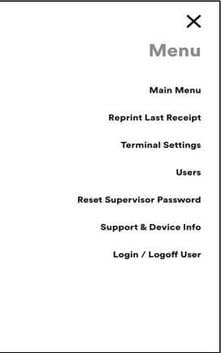
| Login / Logoff User |
Select Login/Logoff User. To login a User, enter the User ID and the User Password, then select Login at the bottom of the screen. Confirmation of a successful Login will appear, then it will go to the Sale screen. To logout a User, a confirmation to Log Out will appear. Select YES. It will then go back to the User Login screen. |
| Reprint Last Receipt |
Select Reprint Last Receipt. Quickly and easily print a receipt from the previous transaction. |
| Terminal Settings |
Select Terminal Settings. Displays values that connect the application to the processing gateway. Changing values will cause processing to stop. |
| Support & Device Info |
Need to contact the Help Desk? Quickly view and print important information about your device. |
| User (Additional Clerks) |
Prior to shipment, the app is configured with default credentials with a user name of 123 and password of 123. Additional Clerks may be added. Select Users and follow screen prompts to enter user details. |
| Reset Supervisor Password | Coming Soon! |